BioSamples Submission
Managing BioSamples Users
User registered into InjectTool need to be registered even into BioSamples submission
system in order to submit data to BioSamples using the pyUSIrest package.
Since we can’t store 3rd party user credentials in InjectTool, we have a manager
user registered into EBI servers which will monitor BioSamples submission and collect
results on behalf of InjectTool registered users. In order to do this, such manager
user need to share the same BioSample teams with InjectTool users:
when a new user completes the registration process, the manager user will create
a new team for the new user and will add such user into the team. In such way, the
manager user will belong to all the groups created during user registration, and this
is needed in order to monitor user jobs without requesting user credentials. User
credentials are required in order to submit data into BioSamples: when starting
a submission a new token is gerated using pyUSIrest.auth.Auth class,
an the only the generated token is stored in browser session.
For more informations regarding the BioSamples accounts system, please refer to
Setting up a user account and logging in
BioSamples documentation.
By using the pyUSIrest library we can create a new user during the InjectTool registration process:
user_id = User.create_user(
    user=form.username,
    password=password,
    confirmPwd=confirmPwd,
    email=email,
    full_name=full_name,
    organisation=affiliation
)
Then the manager user create a new team in which will add the new registered user:
auth = get_manager_auth()
admin = User(auth)

team = admin.create_team(
    description=description,
    centreName=affiliation
)
After that, the manager user will add the new user to the new team:
domain = admin.get_domain_by_name(team.name)
domain_id = domain.domainReference

admin.add_user_to_team(user_id=user_id, domain_id=domain_id)
Finally, the new user will have his dedicated team in order to do his submissions, while the manager user shares the same team in order to monitor the whole submission process. No user credentials are stored into the InjectTool database system during the registration process.
Generating User tokens
When a user wants to submit data to BioSamples, he’s required to generate a BioSamples token through InjectTool. The generated token is then tracked in browser session, in order to be private to the user connecting to InjectTool:
name = form.cleaned_data['name']
password = form.cleaned_data['password']

auth = get_auth(user=name, password=password)

self.request.session['token'] = auth.token
Such token is used during the submission process, in such way we can ensure that the user only will do the submission. The generated token is then copied into the redis database from the user session in order to start the submission process on the background:
client = redis.StrictRedis(
    host=settings.REDIS_HOST,
    port=settings.REDIS_PORT,
    db=settings.REDIS_DB)

key = "token:submission:{submission_id}:{user}".format(
    submission_id=self.submission_id,
    user=self.request.user)

logger.debug("Writing token in redis")

client.set(key, auth.token, ex=auth.get_duration().seconds)
By doing this, the submission process could be done by the system using parallel tasks. By saving the generated token we don’t need to track user credentials in order to do the submission, and token itself has a limited duration and can’t be accessed outside the InjectTool application
The USI Submission Statuses
In order to submit data into BioSamples, you need to create a Submission, as
described in Data Submission Portal, or use the pyUSIrest.usi.Team.create_submission()
method. The Submission created in the Data Submission Portal by InjectTool will be a copy of
the data contained in InjectTool UID, and such object is required in order to
submit data into BioSamples. There’s a status property which identifies the particular
stage in submission process, and you can check this using pyUSIrest.usi.Submission.status()
property or by following the submissionStatuses links of your submission data.
When you start submitting data by creating a Submission into BioSample, status
will be in Draft stage: in this stage you can add and remove data from your
Submission without problems. You can also delete the entire Submission if you
need. Every time you add or remove a Sample from a Submission, a validation
process is started from BioSample service, in order to check taxonomy or other ontologies.
If no issues are found by the BioSamples validators, the Submission could be finalized
in order to be submitted to BioSamples. Once the Submission is finalized, you can’t
modify or delete anything from your Submission. The BioSamples system will
change Submission status in Processing and then in Complete status when data
are placed in BioSamples public archives. InjectTool will manages each different
stages by managing different statuses, for example will finalize a Submission only
if no errors occours, and will track BioSamples id into UID when Submission will
enter into Complete stage. The following figure represents the different BioSamples
status stages:
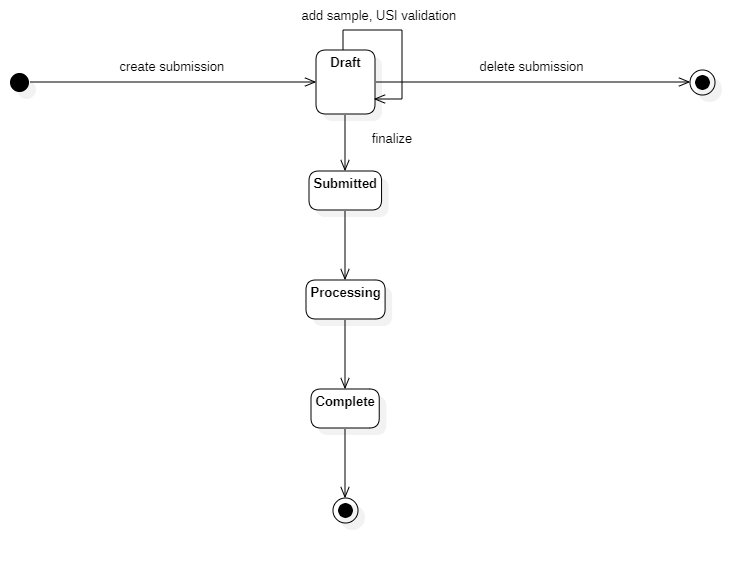
The Submission Process
When the submission process starts, the system retrieves the token from the database and then creates the required objects to create a BioSamples submission using the pyUSIrest package:
self.token = client.get(key).decode("utf8")
self.auth = get_auth(token=self.token)
self.root = pyUSIrest.usi.Root(auth=self.auth)

team = self.root.get_team_by_name(self.team_name)
self.usi_submission = team.create_submission()
After that, the object stored in database are converted into JSON and added
to BioSamples submission on the fly:
sample = self.usi_submission.create_sample(model.to_biosample())
Note
this guide describe the case of submitting a new sample using a new submission. InjectTool can also recover a failed submission or update an already submitted sample. Please refer to biosample app in order to understand how the different cases are managed
The Retrieval Process
Once data are submitted to BioSamples, the manager user will try to check Submission status using periodic tasks. For every opened submission, manager user will try to get submission status and check that samples are received without errors into BioSample servers:
# here are pyUSIrest object
self.auth = get_manager_auth()
self.root = pyUSIrest.usi.Root(self.auth)

# here I will track the biosample submission
self.submission_name = self.usi_submission.usi_submission_name

logger.info(
    "Getting info for usi submission '%s'" % (self.submission_name))
self.submission = self.root.get_submission_by_name(
    submission_name=self.submission_name)
BioSamples submission objects could be in Draft or Completed states. When
in Draft status, we have to ensure no errors in order to finalize the submission process:
status = self.submission.get_status()

if len(status) == 1 and 'Complete' in status:
    # check for errors and eventually finalize
    self.finalize()
After finalization, the manager user will search for submission in Completed
state. When in Completed state, BioSamples IDs are tracked into InjectTool and
the whole submission process is considered as COMPLETED and finished:
for sample in self.submission.get_samples():
    # derive pk and table from alias
    table, pk = parse_image_alias(sample.alias)

    sample_obj = get_model_object(table, pk)

    # update statuses
    sample_obj.status = COMPLETED
    sample_obj.biosample_id = sample.accession
    sample_obj.save()

self.usi_submission.status = COMPLETED
self.usi_submission.message = "Successful submission into biosample"
self.usi_submission.save()
Removing data from BioSamples
InjectTool was not intended for removing objects from BioSamples (and the BioSamples API doesn’t support data removal, at the moment). If you delete data from InjectTool after BioSamples submission, you will not remove data from BioSamples itself. Moreover, you will loss the possibility to update your BioSamples records using InjectTool, since there’s no way to associate an existing BioSamples record to an InjectTool record. Each BioSamples record submitted using InjectTool and then removed from InjectTool database is considered as an orphan sample record.
Track Orphan BioSamples IDs
The Search Orphan BioSamples IDs tasks, defined in biosample.tasks.cleanup
is scheduled to run and track every BioSamples record with a attr:project:IMAGE
property in the biosample.models.OrphanSample table. When orphan
samples are detected, admins will be notified by email by the same task. Samples
in biosample.models.OrphanSample table can be ignored by setting the
ignore attribute to True: this samples will not be managed by InjectTool
and they will not be submitted for BioSample removal. In order to remove a record
from BioSamples, you need to update the releaseDate attribute in the BioSample
record, since data can’t be removed from BioSamples: in such way this record will
become private (no more public available) by adding a release date in the future.
You can do such operations by using two InjectTool management scripts. These operations
are performed manually since is required the admin intervention to make a sample
private, so no automatic tasks are defined to remove data from BioSamples.
Patch a OrphanSample with a future releaseDate
Once a orphan BioSample ID is tracked in biosample.models.OrphanSample
table, it can be patched by having a future releaseDate using the patch_orphan_biosamples
management script. All samples with the ignored attribute and the READY
state could be submitted to BioSample for removal, simple call the management script
like this:
$ docker-compose run --rm uwsgi python manage.py patch_orphan_biosamples
Samples will be added in new pyUSIrest.usi.Submission object, and only
the required attributes are submitted to BioSamples. The record retrieved from
BioSamples is used in order to determine the correct pyUSIrest.usi.Team
that made the submission and the mininal set of required attribute in order to make
a BioSamples submission:
for orphan_sample in OrphanSample.objects.filter(
        ignore=False, removed=False, status=READY).order_by('team__name', 'id'):

    # define the url I need to check
    url = "/".join([BIOSAMPLE_URL, orphan_sample.biosample_id])

    # read data from url
    response = session.get(url)
    data = response.json()

    # check status
    if response.status_code == 403:
        logger.error("Error for %s (%s): %s" % (
            orphan_sample.biosample_id,
            data['error'],
            data['message'])
        )

        # this sample seems already removed
        continue

    # I need a new data dictionary to submit
    new_data = dict()

    # I suppose the accession exists, since I found this sample
    # using accession [biosample.id]
    new_data['accession'] = data.get(
        'accession', orphan_sample.biosample_id)

    new_data['alias'] = data['name']

    new_data['title'] = data['characteristics']['title'][0]['text']

    # this will be the most important attribute
    new_data['releaseDate'] = str(
        parse_date(data['releaseDate']) + RELEASE_TIMEDELTA)

    new_data['taxonId'] = data['taxId']

    # need to determine taxon as
    new_data['taxon'] = DictSpecie.objects.get(
        term__endswith=data['taxId']).label

    new_data['attributes'] = dict()

    new_data['description'] = "Removed by InjectTool"

    # set project again
    new_data['attributes']["Project"] = format_attribute(
        value="IMAGE")
Fetch patched sample and complete data removal process
Using fetch_orphan_biosamples management script, submissions will be monitored
in order to get info and update database. Please ensure that you are removing the
correct BioSamples id. You can update the orphan submission status using:
$ docker-compose run --rm uwsgi python manage.py fetch_orphan_biosamples
Once the submission is verified, you can finalize your submission by calling
fetch_orphan_biosamples with the --finalize option: after that your data will
be submitted to BioSamples and can’t be modified again. Once data are submitted to
biosamples, call fetch_orphan_biosamples (without --finalize) in order to
track submitted data in the biosample.models.OrphanSample table:
removed samples will have the removed attribute set to True and the COMPLETED
status, and they will not be included in future submissions for data removal.