About InjectTool
Introduction
The IMAGE InjectTool is a tool which makes it easier to archive genebank data into BioSamples from the user point of view. InjectTool is structured as a web application and runs inside a web server. Users can register into website in order to upload their data in a private space, they can validate their data against IMAGE-metadata and can fix or update data using the application. If data are compliant with IMAGE-metadata standards, they could upload their data into BioSamples using and use this application even to maintain and update data from InjectTool to BioSamples. InjectTool site is available here, while its code is available from github
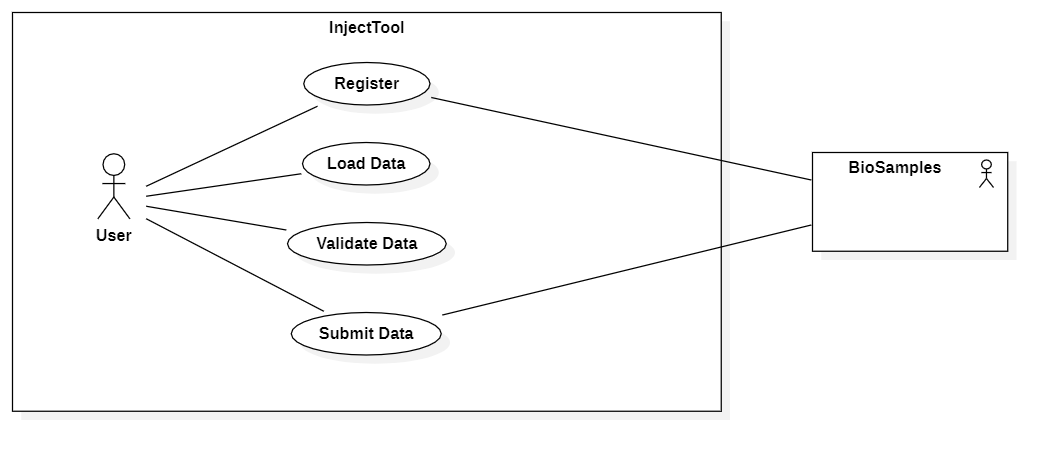
InjectTool composed image
InjectTool is a docker-compose application running Django, NGINX, PostgreSQL, redis and Celery. The application is mainly developed in python, and structured in a django project. Each docker container is structured in order to do specific stuff, and they are linked through docker-composed configuration file.
Here is a graphical presentation of InjectTool system:
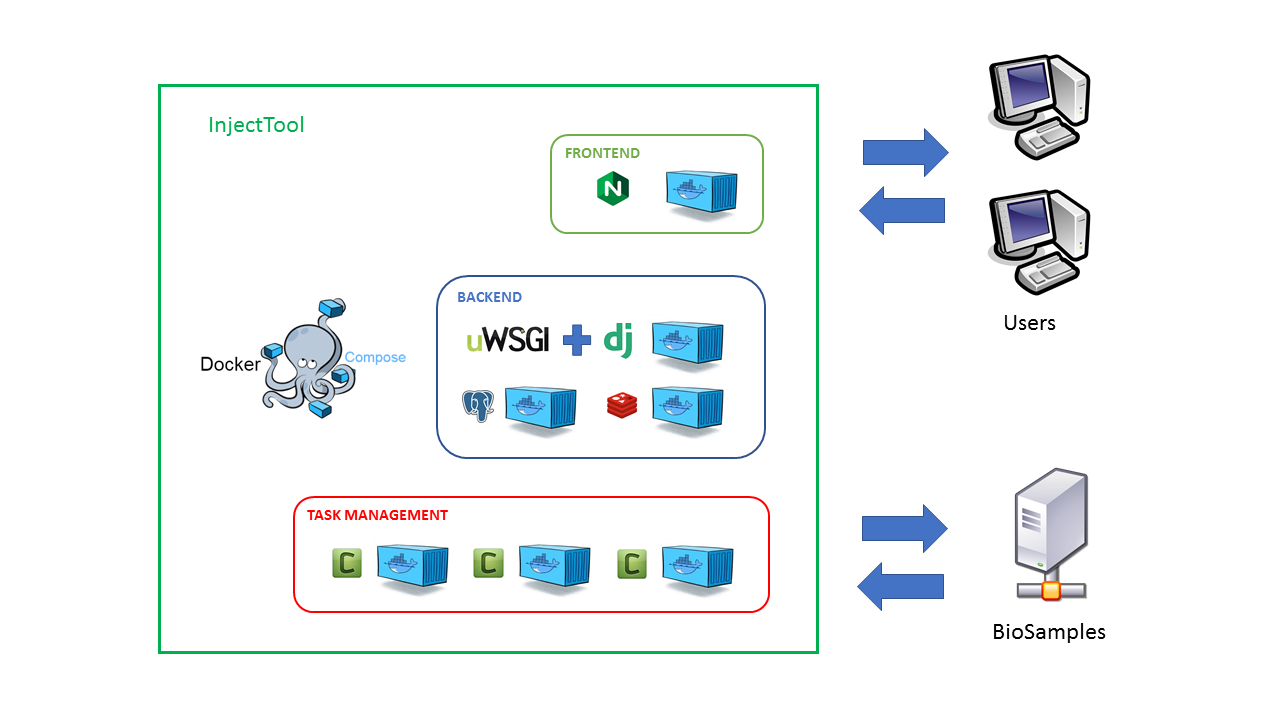
The container componing InjectTool are the followings:
nginx: is the frontend layer to InjectTool. It runs a NGINX instance and it exposes
26080port. It serves InjectTool application to users. It provide the static content of the site and forwards all the dynamic requests to the uwsgi container. The configuration files are inside the nginx folder of InjectTool project.db: is a PostgreSQL instance in which all InjectTool data are stored. The UID is inside this image. All the configuration files are inside the postgres folder, while data will be stored persistently inside the InjectTool working directory inside postgres_data folder
redis: is a redis instance of InjectTool backend. It is required by Celery to store and retrive information for its tasks. It stores temporary data useful for the InjectTool application. It doesn’t store anything outside its container environment, so all its data need to be considered as temporary
uwsgi: is part of the backend layer. It manages django codes, it receives request from NGINX and replies with dynamic content. The configuration files are inside uwsgi folder of InjectTool project, while django code is stored inside and specific InjectTool configuration files are stored in django_data folder
asgi: is part of backend layer. It manages real time message for real time updates (ie status update, messages updates) without reloading pages.
In addtion, we have three container based on uwsgi container which run different celery operations:
celery-worker: The first of the three containers running Celery. It relies on uwsgi container, since it share the same django code of uwsgi. It performs InjectTool time consuming tasks asynchronously, like data import, validation and data submission to BioSamples. It consumes task stored in redis by celery-beat or by the user while doing stuff, and has access to postgres database in order to store data persistently.
celery-beat: The second of the three containers running celery. It send routine tasks or tasks on regular timing to celery-worker. This operates without user intervention
celery-flower: is a monitoring instance of celery workers. It displays information regarding tasks. Its contents are rendered in HTML and reached through
5555port. This container is available only usingdocker-compose-devel.ymlconfiguration file.